

403 Forbidden response.
Configure secure token in the Customer Portal
- Log in to the Gcore Customer Portal and navigate to CDN > CDN resources. Open the resource.
- On the OPTIONS tab, navigate to Access > Secure token.
- Turn on Enable secure token.
- In the Enter a key field, enter a key of 6–32 characters. This key is used in the hash formula on the origin server.
-
To allow access from any IP address, leave Add a client’s IP to the token unchecked. To restrict access to a single IP address, check it — the allowlisted IP is added to the hash formula in the generation scripts. Enterprise customers with mobile audiences have an IP binding mode that ties tokens to a subnet rather than a single IP.
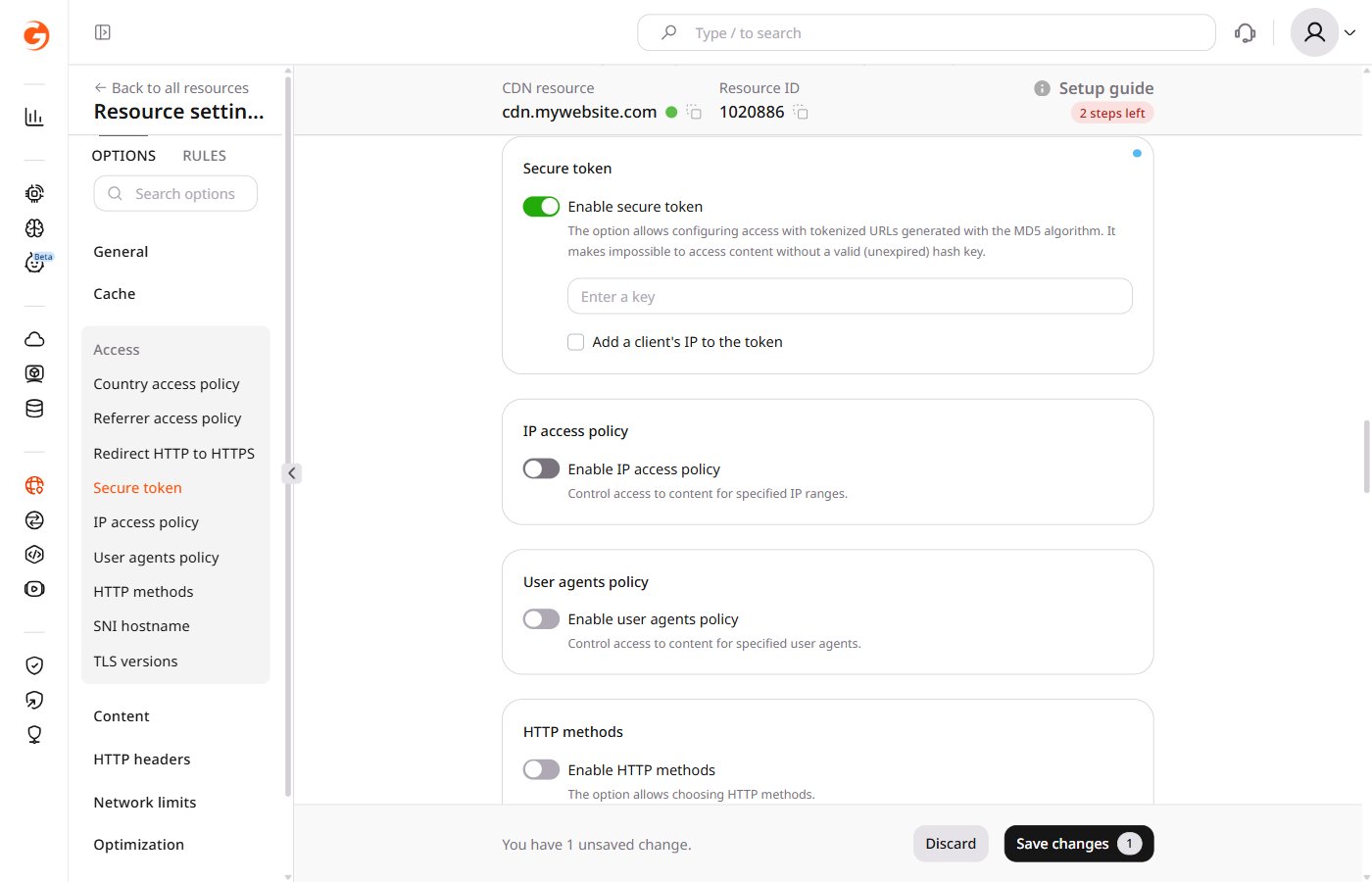
- Click Save changes.
Set up token generation on the origin server
On the origin server, add a script that generates signed links for protected content. Each generated link must follow this format:http://cdn.example.com/photo.jpegis the path to the fileDMF1ucDxtHCxwYQis the MD5 hash of{expires}{path}{ip} {key}(base64-encoded, URL-safe)2147483647is the expiration time in Unix timestamp format
Secure token URL matching
Secure token validates three things from the request URL:md5: the token hashexpires: the Unix timestamp until which the URL is valid- Path: the file path or directory path used when the token was generated
- If the token was generated for an exact file path (e.g.
/images/poster.jpeg), the CDN computes the hash with that same path on every request. Only requests for that exact file pass. - If the token was generated for a directory path ending with
/(e.g./videos/video-1/), the CDN computes the hash using the directory component of the requested path. A request for/videos/video-1/segment-001.tsuses/videos/video-1/as the path in the hash and passes. A request for/videos/video-1/360p/segment.tsuses/videos/video-1/360p/as the directory component — that does not match the token generated for/videos/video-1/, so it returns403 Forbidden.
md5 and expires from playlist body links to the actual media segment requests. It allows a player to receive the token with the master manifest and automatically propagate it to nested requests, each of which is still individually validated against the token path.
Token for exact file
Use an exact file token for standalone files — images, archives, MP4 files, or a single protected video manifest — when nested requests do not need to be authorized with the same token. Example protected file:/images/poster.jpeg. It does not provide access to adjacent files:
Protect HLS and MPEG-DASH content
Use a token with Query String Forwarding enabled for HLS and MPEG-DASH when the player must request a master manifest, nested rendition manifests, media segments, and subtitles under the same path. In this mode, generate the token for the full directory path only — not for a filename. For the files in:/videos/video-1/. It does not work for files in subdirectories — /videos/video-1/360p/ for instance. If HLS or MPEG-DASH files are split across subdirectories, generate tokens for those directories separately or place the related manifests and segments under one directory.
Example HLS files:
- manifest URL: master.m3u8
- hls.js player demo: master.m3u8
&other=parameter is not forwarded):
Token in a path
Tokens embedded into the URL path are not supported for CDN natively. This option is available for Gcore Video Streaming:https://demo-protected.gvideo.iois the CDN URL/videos/2675_pG8TfmKx2LU2qs/is the video IDrI1224fiE3USCa8qYnMuGQis the token1861919999is the expiration time in Unix timestamp format
Scripts for link generation
PHP
Script with IP-based access restriction — the file is accessible only from the allowlisted IP address until the link expires:$secretis the secret key$pathis the path to the file$ipis the IP address allowed to access the content$expiresis the link expiration time as a Unix timestamp$urlis the address of the file
Python
Script with IP-based access restriction:secretis the secret keypathis the path to the fileipis the IP address allowed to access the contentexpiresis the link expiration time as a Unix timestampsecured_urlis the link to the file
OpenSSL
Script that limits the link lifespan and restricts access to an allowlisted IP:2147483647/images/1.jpgis the path to the file prefixed with the expiration timestamp1.2.3.4is the IP address allowed to access the contentsecret_keyis the key entered in step 4 of the portal configuration
{path}?md5={token}&expires={expires}.
IP binding and mobile networks
When a secure token is bound to the client’s IP address, the CDN recomputes the hash using the IP it sees on the incoming request. This becomes a problem on some mobile networks. In certain countries, mobile ISPs change a subscriber’s public IP address very aggressively — sometimes within minutes — because they route many subscribers through carrier-grade NAT (CGNAT) and rotate addresses across a pool. A token signed for one IP fails as soon as the carrier moves the user to another. The effect is most visible with Query String Forwarding for video. The player requests the manifest, gets a token, and the token is forwarded to related sub-segments. If the mobile ISP switches the client IP between requests, the next segment returns403 while earlier segments returned 200. Receiving 200 and 403 responses almost simultaneously for the same user on a mobile network is a strong indicator of mobile IP rotation rather than an expired or malformed token.
For Enterprise customers, Gcore can change the default token behavior from binding to a dedicated IP to binding to a wider subnet mask — /24 or /16 for very aggressive mobile operators. A wider mask still ties the URL to the ISP block — external sharing and hotlinking remain blocked — while tolerating IP rotation within that block. To enable it, contact Gcore support or an account manager.