The Change TLS versions option controls which TLS protocol versions end users can use when connecting to a CDN resource over HTTPS. By default, the option is disabled and all protocol versions are allowed: SSLv3, TLSv1, TLSv1.1, TLSv1.2, TLSv1.3. When the option is enabled, only the versions listed in the configuration are accepted. Requests from clients using any other version are rejected. TLSv1.2 and TLSv1.3 are the recommended versions — older versions (SSLv3, TLSv1, TLSv1.1) are deprecated and considered insecure. To configure allowed TLS versions:
  1. In the Gcore Customer Portal, navigate to CDN. The CDN resources page opens.
  2. Click the CNAME of the resource to open its settings.
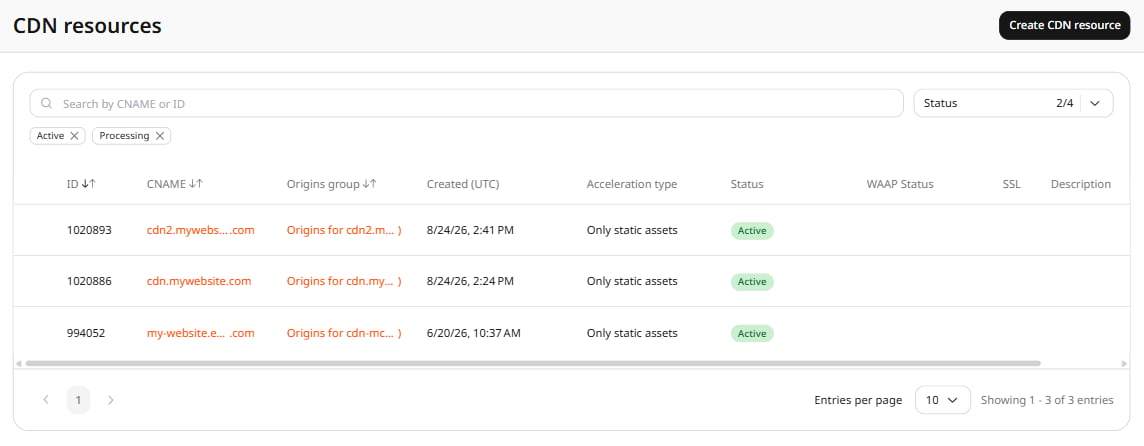
CDN resources page with a resource CNAME highlighted
  1. Open the OPTIONS tab and scroll to the Access section. Click TLS versions in the left sidebar.
  2. Turn on the Change TLS versions toggle. The Choose TLS versions field appears, pre-populated with TLSv1.2 and TLSv1.3.
  3. Add or remove protocol versions as needed. To add a version, click the field and select from the dropdown. To remove a version, click × next to it.
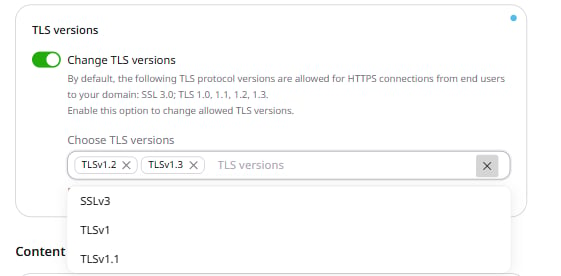
TLS versions section with toggle enabled, showing TLSv1.2 and TLSv1.3 selected and available versions in dropdown
  1. Click Save changes.