

- Quality — sets the quality level for images. Lowering the quality value also reduces file size, so images reach users faster.
- Compression — converts images to WebP and AVIF formats, providing up to 55% file size savings at a given quality level.
- Resize — reduces the height, width, and scale of the original image.
- Crop — removes unwanted image area beyond the specified dimensions.
- Original image
- Compression
- Quality
- Resize
- Crop

- Format: jpg
- Quality: 100%
- Size: 3.55 MB
- W×H: 553×743 px




Processing pipeline
When Image Stack is enabled on a CDN resource, requests for images are routed through the Image Processor. The Image Processor fetches the original image from the origin, applies the configured transformations, and stores the processed version in the CDN cache.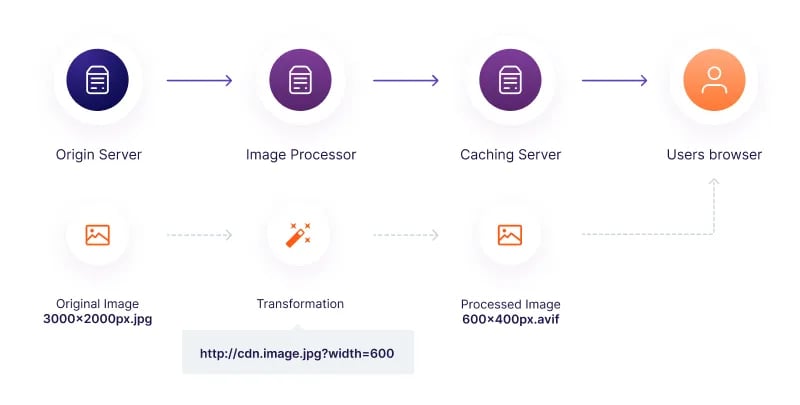
- X-Img-Operations — operations performed
- X-Img-Origin-Download-Time — time to download the image from the origin, in milliseconds
- X-Img-Origin-Size — original image size in bytes
- X-Img-Processing-Time — time taken to transform the image, in milliseconds
- X-Img-Saved-Bytes — how many bytes the image size decreased after processing
- X-Img-Server — the server that processed the image
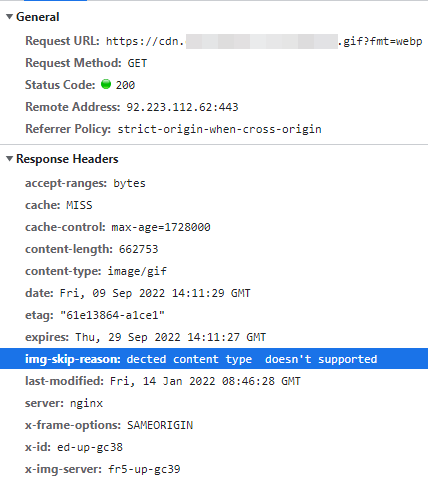
- Img-Skip-Reason — the reason an operation was not performed
- Resizing
- Cropping
- Compression to WebP or AVIF, with quality adjustment
The Quality operation cannot run independently. Enable at least one other operation — Compression, Resize, or Crop — alongside Quality.
Processing limitations
If an image cannot be processed, CDN serves the original image from the origin. The following conditions prevent Image Stack from processing an image:- Original quality is lower than the target quality. If the original image quality is 45 and the target is 80, processing would increase the file size rather than decrease it.
- Gzip compression is applied to the original image. If the image contains the
Content-Encoding: gzipheader, Image Stack cannot unzip the original. - The browser does not support the target format. If the request does not advertise support for
image/webporimage/avif, Image Stack does not convert the image to the corresponding format. - Unsupported image format. Image Stack processes only JPG and PNG files. GIF and other formats are served as-is.
Img-Skip-Reason response header to identify why an image was not transformed.
Conflict with the Rewrite option
Google Chrome and other browsers add theAccept: image/webp, image/avif header to all requests — including requests for static files like PHP and JS scripts, not only images. When Image Stack is enabled for the entire resource, those requests are routed to the Image Processor.
The conflict occurs when the Rewrite option is also active. The Rewrite option redirects requests to the origin, which responds with a 3xx code. The Image Processor cannot return 3xx responses to clients — it follows the redirect in a loop until receiving a non-3xx response, making PHP and JS files inaccessible.
To avoid this, configure Image Stack as a rule scoped to image/jpeg and image/png MIME types rather than enabling it for the entire resource. The Enable Image Stack article covers the rules configuration.
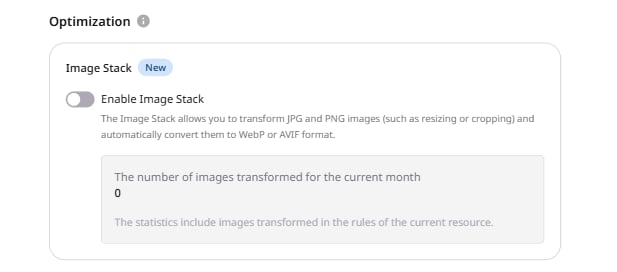
Enable Image Stack for the entire resource in Resource Settings only when the origin consists entirely of static image assets.