

Multiple restreaming
Technically, the number of restreams is not limited. By default, we enable one available restream per account. If you want to use more than one, contact technical support and specify the number of restreams. We will notify you when the feature is activated. After that, you will be able to use it for your account.Restream failover
Just like for regular streams, restreams have a failover algorithm too. If there is a problem getting the original stream, it will be re-requested multiple times. Restream retry algorithm:- Original stream is active.
- If the original stream is unavailable and is down for more than ±3 seconds, the retry mechanism activates.
- The system attempts to re-request (PULL) the original stream for approximately 60 minutes:
- If the original stream recovers, the timer resets and restreaming resumes automatically.
- Otherwise the restream stops permanently. To resume it, activate it manually or via API.
Restream troubleshooting
RTMP targets
The main risk with RTMP targets is that the destination can terminate the stream when delivery becomes too slow or unstable. RTMP works best for short, stable paths and moderate bitrates. For public internet restreaming, a practical bitrate is usually around 1-3 Mbps, depending on route quality and the target server. Bitrates above 5 Mbps can cause stream interruptions. If the problem is caused by latency, jitter, packet loss, or insufficient bandwidth on a long-distance route, use SRT instead of RTMP. Typical comb with packet loss in RTMP for long distance: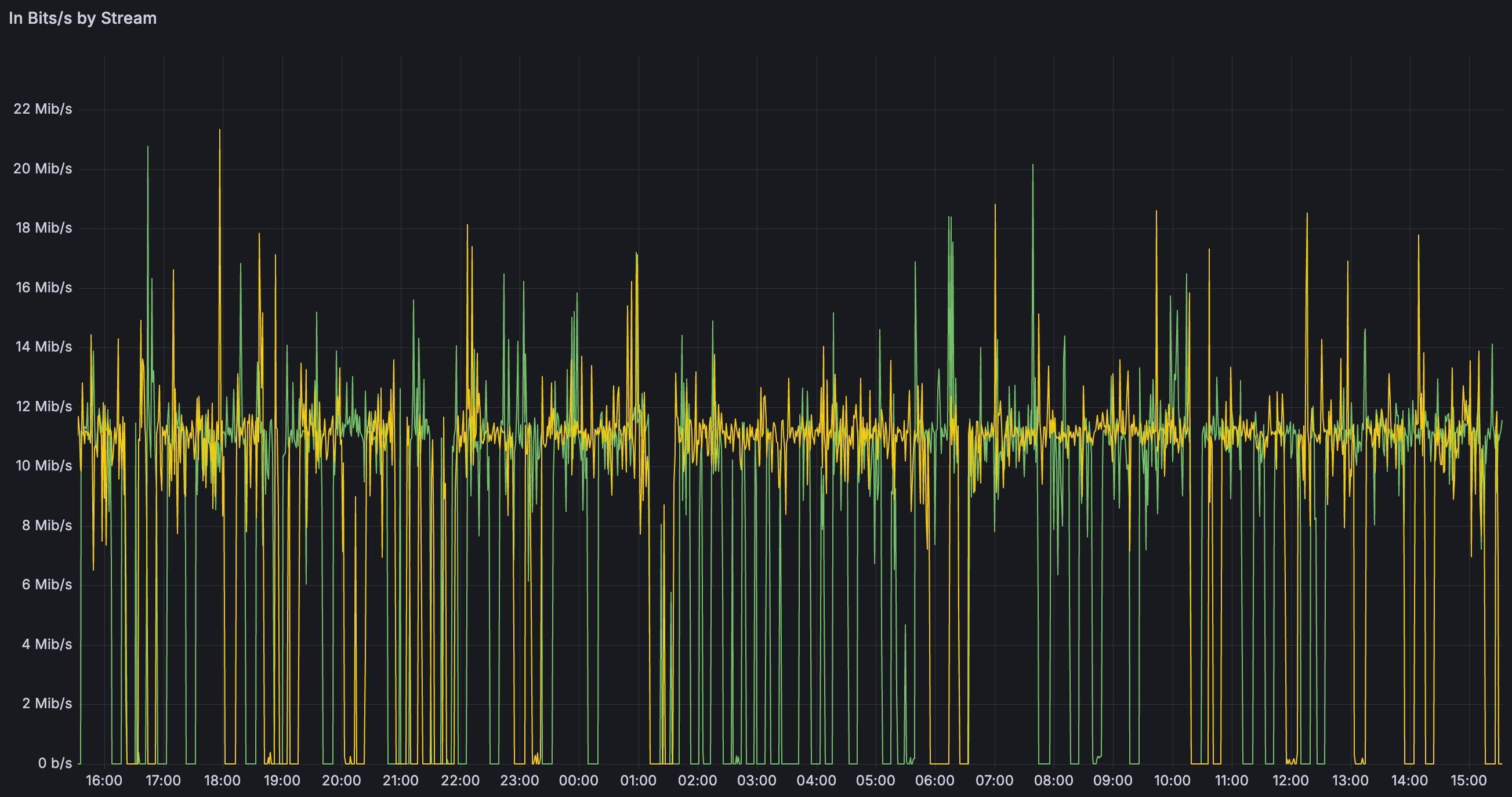
SRT targets
Common issues:- Wrong SRT mode: Gcore supports only
mode=callerfor SRT restream targets. The destination must listen for the incoming SRT connection. - Latency too low: Long-distance paths have high RTT, jitter, or packet loss. If
latencyis too low, retransmitted packets arrive late and the target may report TS loss or dejitter buffer resets. - Target bandwidth lower than source bitrate: Restreaming sends the source stream as-is. Use a lower-bitrate source or a transcoded stream if the target cannot sustain the full bitrate.
- Firewall or UDP filtering: SRT uses UDP; the target host and network must allow inbound UDP on the configured port.
- Encryption mismatch: If the target requires encryption,
passphraseandpbkeylenmust match the target configuration.
- Use
mode=callerin the SRT target URI. - Increase
latencyto 2–3 seconds or more for long public internet routes. - Verify UDP reachability to the target SRT port.
- Match all required target parameters:
streamid,passphrase,pbkeylen,pkt_size, buffer settings.
- Expired or invalid stream key: The connection is rejected if the event is marked finished in Facebook UI or the stream key was regenerated.
- Keyframe interval exceeds 4 seconds: Facebook enforces a maximum GOP size of 4 seconds.
- Unstable or insufficient bitrate: Significant drops may cause Facebook to terminate the stream.
- Incorrect event configuration: Using an outdated or incorrect stream key leads to immediate connection failure.
- Confirm the stream key is active and the event is in Live or Preview state.
- Set keyframe interval to 2 seconds (recommended) or 4 seconds (maximum).
- Maintain a stable, constant bitrate.
- Update stream keys after Facebook regenerates them.
YouTube
Common issues:- Invalid stream key or inactive event: YouTube rejects connections when the key is incorrect or the event is not yet open.
- Unsupported codec or profile: YouTube requires H.264 (Baseline/Main/High) and AAC audio.
- Unstable input bitrate: Bitrate drops cause buffering and disconnects.
- High keyframe interval: YouTube recommends a GOP of 2 seconds.
- Verify the stream key and event status before connecting.
- Use H.264 + AAC encoding.
- Set keyframe interval to 2 seconds.
- Ensure encoder output is stable and avoids bitrate spikes.
Twitch
Common issues:- Rate limiting: Frequent connection attempts may trigger temporary limits.
- Excessive bitrate: Twitch recommends a maximum of 6,000 Kbps for non-partners.
- Unsupported codec settings: Twitch requires H.264 + AAC.
- Disconnects due to unstable upstream: Twitch is sensitive to jitter and packet loss.
- Follow Twitch bitrate and profile recommendations.
- Use a 2-second keyframe interval.
- Select the closest ingest server.
- Use CBR and ensure stable network paths.
Other platforms
Common issues:- Stream keys are frequently rotated.
- Strict GOP/keyframe interval requirements (often 2 seconds).
- Dynamic regional ingest endpoints.
- Some platforms accept only RTMP or specific RTMP variants.
- Validate the latest stream key before restreaming.
- Use a standard 2-second keyframe interval unless specified otherwise.
- Maintain consistent bitrate and resolution.
- Review platform-specific RTMP error codes for precise causes.