> ## Documentation Index
> Fetch the complete documentation index at: https://gcore-doc-2189.mintlify.site/llms.txt
> Use this file to discover all available pages before exploring further.
# Instant clips
## Main principles
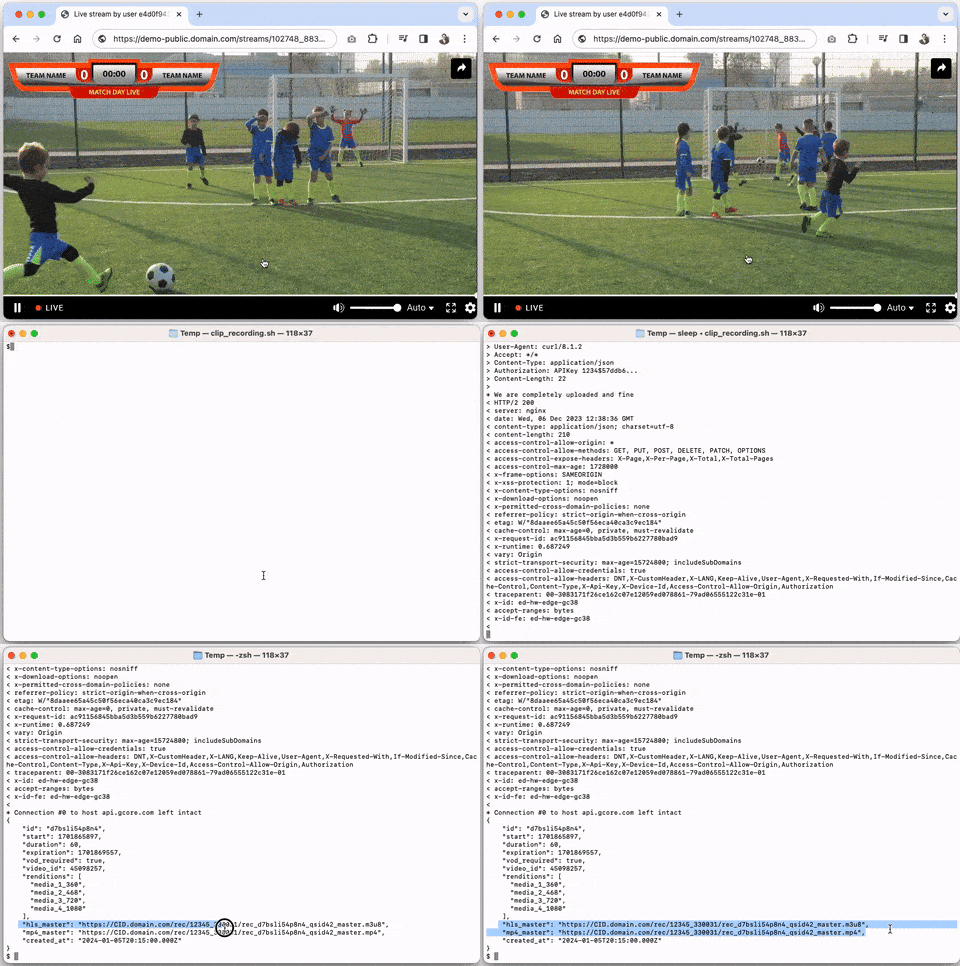
Clips let you cut a segment from an ongoing live stream without waiting for the broadcast to end or the full recording to complete.
This is useful for quickly publishing highlights from sports, news, concerts, or other live events.
**Why use clips?**
* Deliver important moments to viewers instantly, while the event is still live.
* Share highlights across platforms without waiting for full VOD processing.
* Convert a short live excerpt into a standalone asset in HLS (.m3u8), MP4, or as a permanent VOD.
**Common use cases:**
* Sports highlights — publish goals, replays, or decisive moments immediately after they happen.
* News coverage — cut and share breaking news segments without waiting for the full recording.
* Live performances — highlight songs, interviews, or standout moments from concerts or shows.
## Clips vs. traditional VOD
| Feature | Traditional VOD | Clips |
| ---------------------- | -------------------------------------------------------------- | ----------------------------------------------------------- |
| **Source** | Recording of the full live stream | Raw data from the ongoing live stream |
| **Availability** | Only after the live stream has ended and transcoding completes | Immediately after the selected segment is copied from DVR |
| **Use case** | Full replays, long-term storage, on-demand catalogs | Highlights, instant sharing, short previews |
| **Formats** | HLS, DASH, MP4 (transcoded renditions) | HLS, MP4 |
| **Latency to publish** | Minutes (depends on stream length & transcoding time) | Seconds (available right after clip duration ends) |
| **Lifetime** | Permanent until manually deleted | Temporary (controlled by `expiration`) |
| **Storage impact** | Requires full file storage | Lightweight, stored in server memory until expiration |
| **Conversion to VOD** | N/A (already VOD) | Can be converted to permanent VOD with `vod_required: true` |
| **Best for** | Full-event replays, archives, monetization catalogs | Instant highlights, social media snippets, news flashes |
## Clips lifetime
Instant clips are a copy of the stream from DVR buffer.
They are stored in memory for a limited time, after which the clip ceases to exist and returns a 404 on the link.
**Limits to keep in mind:**
* The clip's lifespan is controlled by the `expiration` parameter.
* The default expiration value is 1 hour. The value can be set from 1 minute to 4 hours (but not more than the DVR duration of the stream).
* If you want a video for longer or permanent viewing, create a traditional VOD based on the clip using `vod_required: true`.
* The clip becomes available only after it is completely copied from the live stream, at `start + duration`. Requesting it before that returns `425 Too Early`.
## Create and list clips
An [API token](/account-settings/api-tokens) is required. DVR must be enabled on the stream (`dvr_enabled: true`). Clips are cut from the DVR buffer — the stream must be live and actively receiving an ingest signal.
```bash theme={null}
export GCORE_API_KEY="{YOUR_API_KEY}"
export STREAM_ID="{YOUR_STREAM_ID}"
```
### Enable DVR on a stream
DVR is a prerequisite for clip creation. Enable it when creating or updating a stream. `dvr_duration` sets the buffer size in seconds (30–14400). The clip duration cannot exceed the DVR window.
```python theme={null}
import os
from gcore import Gcore
client = Gcore()
stream_id = int(os.environ["STREAM_ID"])
stream = client.streaming.streams.update(
stream_id,
stream={
"name": "My live stream",
"dvr_enabled": True,
"dvr_duration": 3600, # 1 hour DVR window
},
)
print(f"DVR enabled: {stream.dvr_enabled}, window: {stream.dvr_duration}s")
```
```go theme={null}
package main
import (
"context"
"fmt"
"os"
"strconv"
gcore "github.com/G-Core/gcore-go"
"github.com/G-Core/gcore-go/packages/param"
"github.com/G-Core/gcore-go/streaming"
)
func main() {
client := gcore.NewClient()
ctx := context.Background()
streamID, _ := strconv.ParseInt(os.Getenv("STREAM_ID"), 10, 64)
stream, err := client.Streaming.Streams.Update(ctx, streamID, streaming.StreamUpdateParams{
Stream: streaming.StreamUpdateParamsStream{
Name: "My live stream",
DvrEnabled: param.NewOpt(true),
DvrDuration: param.NewOpt[int64](3600), // 1 hour DVR window
},
})
if err != nil {
panic(err)
}
fmt.Printf("DVR enabled: %v, window: %ds\n", stream.DvrEnabled, stream.DvrDuration)
}
```
```bash theme={null}
curl -X PATCH "https://api.gcore.com/streaming/streams/$STREAM_ID" \
-H "Authorization: APIKey $GCORE_API_KEY" \
-H "Content-Type: application/json" \
-d '{"dvr_enabled": true, "dvr_duration": 3600}'
```
The API returns the updated stream object with `dvr_enabled: true` and `dvr_duration: 3600`.
### Create a clip
Cut a segment from an ongoing live stream. The clip is copied from the DVR buffer. Specify `duration` in seconds and optionally `start` as a Unix timestamp (defaults to the current time). The clip becomes accessible only after `start + duration` seconds — requesting it before that returns `425 Too Early`.
| Parameter | Required | Description |
| -------------- | -------- | --------------------------------------------------------------------------------------------------------------------------------------- |
| `duration` | Yes | Segment length in seconds. Minimum 30 seconds, maximum equals `dvr_duration`. Final length may vary slightly due to keyframe alignment. |
| `start` | No | Unix timestamp of the segment start. Defaults to current time. |
| `expiration` | No | Unix timestamp when the clip expires. Defaults to `start + duration + 3600` (1 hour after clip end). |
| `vod_required` | No | `true` to also save as a permanent VOD in video hosting. |
```python theme={null}
import os
from gcore import Gcore
client = Gcore()
stream_id = int(os.environ["STREAM_ID"])
# Cut the last 60 seconds from the live stream
clip = client.streaming.streams.clips.create(
stream_id,
duration=60,
)
print(f"Clip ID: {clip.id}")
print(f"HLS: {clip.hls_master}")
print(f"MP4: {clip.mp4_master}")
print(f"Expires at: {clip.expiration}")
```
```go theme={null}
package main
import (
"context"
"fmt"
"os"
"strconv"
gcore "github.com/G-Core/gcore-go"
"github.com/G-Core/gcore-go/streaming"
)
func main() {
client := gcore.NewClient()
ctx := context.Background()
streamID, _ := strconv.ParseInt(os.Getenv("STREAM_ID"), 10, 64)
// Cut the last 60 seconds from the live stream
clip, err := client.Streaming.Streams.Clips.New(ctx, streamID, streaming.StreamClipNewParams{
Duration: 60,
})
if err != nil {
panic(err)
}
fmt.Printf("Clip ID: %s\n", clip.ID)
fmt.Printf("HLS: %s\n", clip.HlsMaster)
fmt.Printf("MP4: %s\n", clip.MP4Master)
}
```
```bash theme={null}
curl -X PUT "https://api.gcore.com/streaming/streams/$STREAM_ID/clip_recording" \
-H "Authorization: APIKey $GCORE_API_KEY" \
-H "Content-Type: application/json" \
-d '{"duration": 60}'
```
The API returns the clip object:
```json theme={null}
{
"id": "eycnb3utc6bk",
"start": 1758113719,
"duration": 60,
"expiration": 1758117379,
"vod_required": false,
"video_id": null,
"renditions": ["media_0_720", "media_1_468", "media_2_360"],
"hls_master": "https://cid.domain.com/rec/111_1000/rec_eycnb3utc6bk_qsid42_master.m3u8",
"mp4_master": "https://cid.domain.com/rec/111_1000/rec_eycnb3utc6bk_qsid42_master.mp4"
}
```
The clip becomes accessible only after `start + duration` seconds have elapsed. Requesting it before that returns `425 Too Early`.
To create a clip from a specific moment in the past, pass `start` as a Unix timestamp:
```python theme={null}
import os
import time
from gcore import Gcore
client = Gcore()
stream_id = int(os.environ["STREAM_ID"])
# Cut a 30-second segment that ended 2 minutes ago
start_time = int(time.time()) - 120 # 2 minutes ago
clip = client.streaming.streams.clips.create(
stream_id,
duration=30,
start=start_time,
vod_required=True, # also save as permanent VOD
)
print(f"Clip ID: {clip.id}, VOD video ID: {clip.video_id}")
```
```go theme={null}
package main
import (
"context"
"fmt"
"os"
"strconv"
"time"
gcore "github.com/G-Core/gcore-go"
"github.com/G-Core/gcore-go/packages/param"
"github.com/G-Core/gcore-go/streaming"
)
func main() {
client := gcore.NewClient()
ctx := context.Background()
streamID, _ := strconv.ParseInt(os.Getenv("STREAM_ID"), 10, 64)
// Cut a 30-second segment that ended 2 minutes ago
startTime := time.Now().Add(-2 * time.Minute).Unix()
clip, err := client.Streaming.Streams.Clips.New(ctx, streamID, streaming.StreamClipNewParams{
Duration: 30,
Start: param.NewOpt(startTime),
VodRequired: param.NewOpt(true), // also save as permanent VOD
})
if err != nil {
panic(err)
}
fmt.Printf("Clip ID: %s, VOD video ID: %d\n", clip.ID, clip.VideoID)
}
```
```bash theme={null}
START=$(date -d "2 minutes ago" +%s 2>/dev/null || date -v-2M +%s)
curl -X PUT "https://api.gcore.com/streaming/streams/$STREAM_ID/clip_recording" \
-H "Authorization: APIKey $GCORE_API_KEY" \
-H "Content-Type: application/json" \
-d "{\"duration\": 30, \"start\": $START, \"vod_required\": true}"
```
When `vod_required` is `true`, the response includes `video_id`. Use `GET /streaming/videos/{video_id}` to check processing status and retrieve the permanent HLS/MP4 URLs.
### List clips
Retrieve all non-expired clips for a stream.
```python theme={null}
import os
from gcore import Gcore
client = Gcore()
stream_id = int(os.environ["STREAM_ID"])
clips = client.streaming.streams.clips.list(stream_id)
for clip in clips:
print(f"Clip {clip.id}: duration={clip.duration}s, hls={clip.hls_master}")
```
```go theme={null}
package main
import (
"context"
"fmt"
"os"
"strconv"
gcore "github.com/G-Core/gcore-go"
)
func main() {
client := gcore.NewClient()
ctx := context.Background()
streamID, _ := strconv.ParseInt(os.Getenv("STREAM_ID"), 10, 64)
clips, err := client.Streaming.Streams.Clips.List(ctx, streamID)
if err != nil {
panic(err)
}
for _, clip := range *clips {
fmt.Printf("Clip %s: duration=%ds, hls=%s\n",
clip.ID, clip.Duration, clip.HlsMaster)
}
}
```
```bash theme={null}
curl "https://api.gcore.com/streaming/streams/$STREAM_ID/clip_recording" \
-H "Authorization: APIKey $GCORE_API_KEY"
```
The API returns an array of non-expired clip objects. Expired clips are automatically removed and no longer appear in the list.